
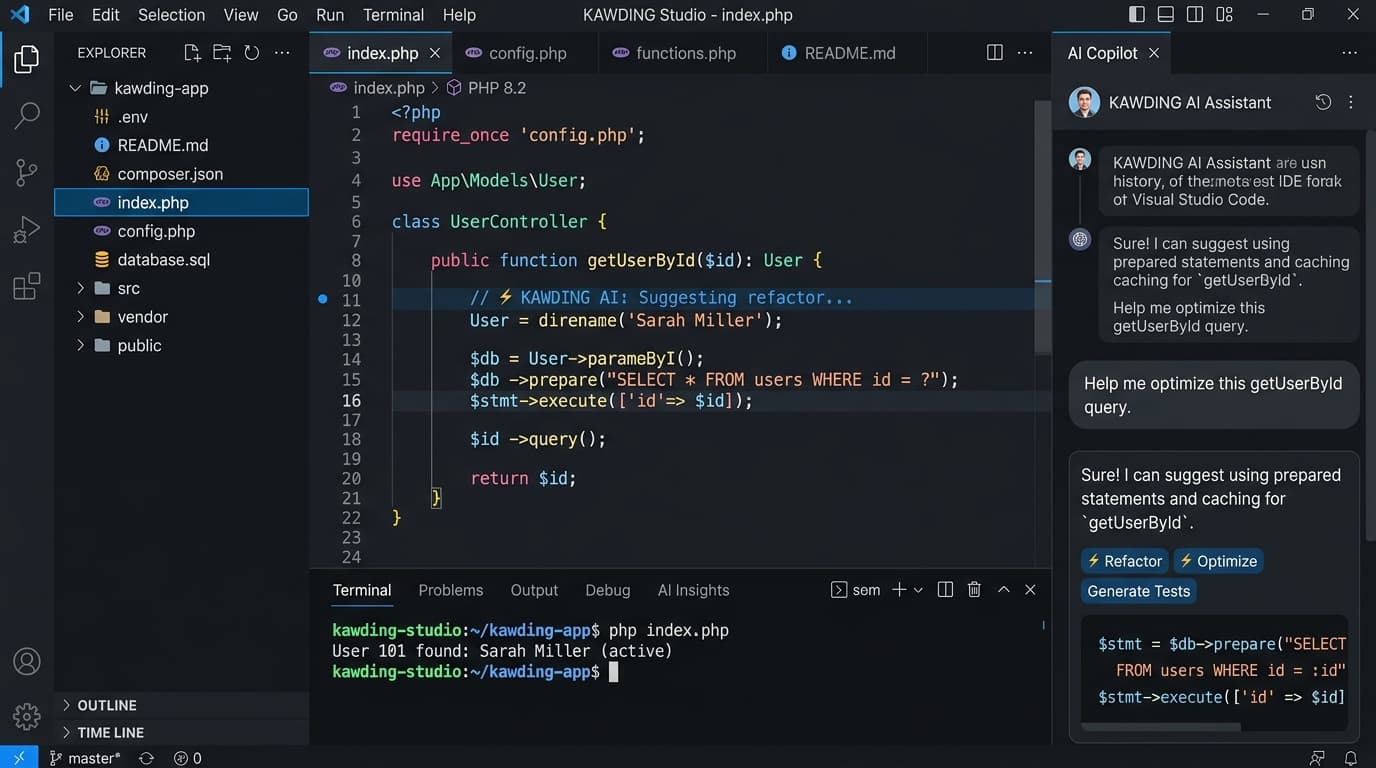
Bridging Modern AI Assistance with Battle-Tested PHP Infrastructure
While modern AI coding tools focus heavily on complex JavaScript frameworks, millions of high-performing websites and online stores run on PHP and MySQL hosted on cPanel, Hostinger, or standard VPS servers. Developers frequently struggle with AI tools that produce unrunnable snippets or ignore database schemas.
KAWDING is engineered from the ground up for the PHP ecosystem. It features an in-browser Monaco code editor, an autonomous multi-file planner, a live remote MySQL PDO query console, and a built-in terminal CLI.
With 1-click FTP synchronization, you can build full-fledged web applications with secure PDO prepared statements, CSS design systems, and responsive layouts, and deploy them directly to your live Hostinger public_html folder without touching local command lines.
From AI Prompt to Live Deployed Website
Describe Your Application Scope
Provide your project requirements in natural language. The autonomous planner outlines file trees, database schemas, and frontend templates.
Multi-File Code Generation & Monaco Editing
KAWDING generates clean PHP 8.3 scripts, secure PDO queries, and stylesheets. Review and customize code in the built-in VS Code editor.
Live MySQL PDO Migration
Connect directly to your live remote MySQL database to inspect tables, test queries, and execute SQL migrations safely.
One-Click Hostinger FTP Deployment
Deploy files straight to public_html with smart database config adaptation and zero local disk clutter.
Core Technical Capabilities
Secure PDO Database Generation
All generated queries utilize PHP PDO prepared statements with strict parameter binding to eliminate SQL injection risks.
Hostinger & cPanel 1-Click FTP Deploy
Bi-directional in-memory FTP synchronization securely uploads files directly to live hosting environments.
Integrated Monaco Code Editor
Full VS Code experience in your browser with syntax highlighting, autocomplete, and multi-file tab navigation.
Interactive Web Terminal CLI
Run PHP 8.3 linter checks, Composer dependency audits, and Git version snapshots directly in the cloud studio.
Technical Specifications & Latency Parameters
| Target Runtime | PHP 8.2 / 8.3 with MySQL 8.x |
| Editor Engine | Monaco Editor (VS Code core) |
| Deployment Protocol | Secure FTP / FTPS direct streaming |
| Database Protocol | Remote PDO over TLS with SSL verification |
| Version Control | Per-project Git branch snapshots |
Production Code Snippets
<?php
declare(strict_types=1);

class Database {
    private static ?PDO $instance = null;

    public static function getConnection(): PDO {
        if (self::$instance === null) {
            $dsn = sprintf('mysql:host=%s;dbname=%s;charset=utf8mb4',
                getenv('DB_HOST') ?: 'localhost',
                getenv('DB_NAME') ?: 'app_db'
            );
            self::$instance = new PDO($dsn, getenv('DB_USER'), getenv('DB_PASS'), [
                PDO::ATTR_ERRMODE => PDO::ERRMODE_EXCEPTION,
                PDO::ATTR_DEFAULT_FETCH_MODE => PDO::FETCH_ASSOC,
                PDO::ATTR_EMULATE_PREPARES => false,
            ]);
        }
        return self::$instance;
    }
}
Production Implementation Insights
Store Database Credentials in Environment Files
Use an env.php or .env file excluded from public view to ensure production passwords are never exposed in Git trees.
Test SQL Migrations in Remote Console
Always use the studio SQL runner to inspect tables before applying schema alterations to live production databases.
Frequently Asked Questions & Integration Details
Can KAWDING deploy directly to shared hosting like Hostinger?
Yes! KAWDING includes a built-in FTP sync engine designed specifically for Hostinger, cPanel, and standard shared hosting environments.
Do I own the code generated inside KAWDING?
Yes. You own 100% of the code, templates, and database schemas created within the studio. There are no proprietary lock-ins.
Does KAWDING support live MySQL database connections?
Yes. You can supply your remote MySQL host credentials (such as Hostinger remote MySQL IP) to inspect tables and execute queries in real time.